Anime Salt Hindi: How to Find Hindi Dubbed Anime and Subtitles
A practical guide to checking Hindi language options, separating dubbed audio from subtitles, and avoiding unsupported APK or catalog claims.

Table of Contents
If you searched for anime salt hindi or anime salt hindi dubbed, you probably want one of three things: a Hindi-language app interface, Hindi audio, or Hindi subtitles for a specific show. Those are different features. A language selector can change menus while the episode still uses Japanese audio, and a subtitle track can be available even when a Hindi dub is not.
The safest way to check is to treat the app screenshot, the episode player, and the download source as separate evidence. The site-owned app screenshot used in this guide shows a Hindi selection option, but it is not a promise that every title has a Hindi track. Test one episode, inspect its player controls, and stop if the source makes unsupported claims about an official APK, a verified version, or a guaranteed catalog.
This guide focuses on the practical search intent behind anime salt hindi. It explains how to find likely Hindi content, how to tell audio from subtitles, what to do when a track is missing, and why the Google Play app listing and an unverified streaming APK should not be treated as the same product.
Quick Answer: Does Anime Salt Have Hindi Dubbed Anime?
The honest answer is title-by-title and source-by-source. A Hindi button or Hindi-selected interface can show that the app supports Hindi navigation, but it cannot verify Hindi dubbing for a particular episode. Open the title, start playback, and look for an audio or language menu. If the menu lists only Japanese or English, the episode does not have a Hindi audio track from that source.
Hindi subtitles are a separate possibility. Look for CC, Subtitles, or Captions after playback starts. If Hindi is listed there, choose it and test timing on a short scene. If neither Hindi audio nor Hindi subtitles appear, try another legitimate source or a licensed service rather than installing a random modified APK.
| What you see | What it proves | What it does not prove |
|---|---|---|
| Hindi in the app menu | The interface may offer Hindi navigation | Hindi dubbing for every show |
| Hindi in the audio menu | That episode source advertises a Hindi audio track | The same track exists on every server or title |
| Hindi in the subtitle menu | A Hindi caption file may be available for that episode | The captions are accurate, complete, or officially licensed |
| A third-party APK page | Only that a page is making a download claim | Official ownership, safety, or the latest version |
Use the episode player as the final language check. Do not use a homepage badge, app name, or APK filename as proof of Hindi audio.
Hindi App Language, Hindi Audio, and Hindi Subtitles Are Different
The phrase anime salt hindi is ambiguous because people use it for several different tasks. The interface language changes labels such as search, home, or categories. Hindi audio changes the spoken track. Hindi subtitles change the written translation. A viewer may need one, two, or all three, so check them in that order instead of assuming that one setting controls everything.
The repository's site-owned mobile screenshot shows Hindi selected alongside other language choices. Treat it as a real visual reference for the interface only, not as an official store screenshot or proof of a complete Hindi-dubbed catalog. The app may also display third-party streaming sources whose language options vary by title, region, and server.
Interface language
Changes navigation labels and menus. It is the easiest option to verify, but it says nothing about the episode's spoken language.
Hindi audio
Changes the voice track. Open the player audio menu and test a short scene before committing to a full episode.
Hindi subtitles
Adds written captions. Check timing, readability, and whether signs or dialogue are actually translated.
Source availability
Different servers can expose different tracks. A missing Hindi option may be a source limitation rather than an app-setting failure.
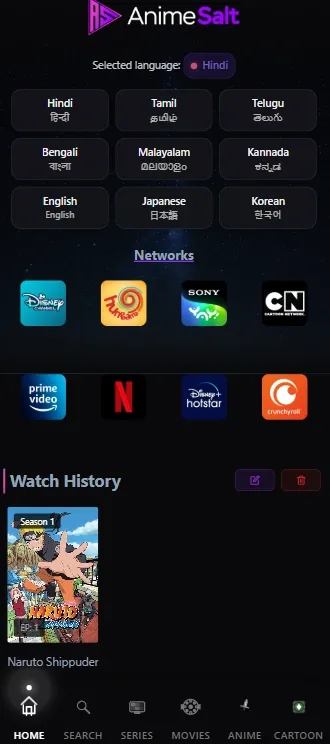
A language selector answers 'what language is the menu?' The player answers 'what language is this episode?'
How to Search for Hindi Anime and Test the Track
Start with a specific show or season rather than trusting a broad promise such as 'all Hindi dubbed anime'. Search for the title, open its detail page, and choose an episode that is short enough to test. A search result can identify a show while the actual source controls its available audio and subtitle files.
When the episode begins, test the language controls before changing APKs or clearing storage. If the player has no visible menu, tap the video once on a phone or press the center button on Android TV. Check audio first, then subtitles, then source. Record what you actually see instead of repeating a mirror page's marketing text.
- Search the exact title and season; do not rely on a generic Hindi badge.
- Open an episode and wait until the player controls are visible.
- Check Audio or Language for Hindi, then test a short spoken scene.
- Check CC, Subtitles, or Captions for Hindi and verify timing.
- If Hindi is absent, switch source only when the source is trusted and clearly identified.
- Do not download a modified APK just to unlock a language label.
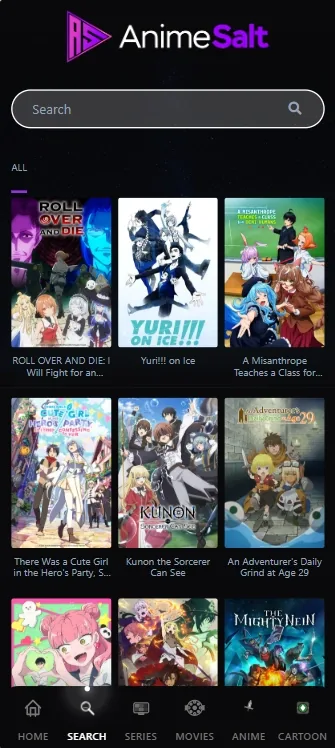
Search finds the title; the episode player verifies the language. Keep those two steps separate.
What to Do When Hindi Audio or Subtitles Are Missing
Missing Hindi does not automatically mean the app is broken. The source may not carry that language, the title may have a regional release restriction, or the file may expose subtitles only after playback starts. Try the low-risk checks first: confirm the episode, reopen the player controls, test another source with a clear identity, and compare the same title on an official licensed service.
If a source claims 'every anime in Hindi' but cannot show a title-level track, package identity, release information, or a stable publisher, treat the claim as unverified. Do not grant notification, accessibility, storage, or device-admin permissions simply because a download page promises a Hindi dub.
| Symptom | Likely explanation | Safer next step |
|---|---|---|
| Hindi is in the menu but not the player | UI language and episode tracks are separate | Check Audio and CC inside the episode |
| Hindi subtitles load on one source only | Subtitle files vary by source | Use the clearly identified source and compare timing |
| Audio changes but captions disappear | Audio and subtitle tracks are independent | Reopen CC after selecting the audio track |
| The APK promises Hindi everywhere | Marketing claim is broader than available evidence | Stop and verify the publisher, package, and release source |
A missing track is usually a content-source or title-availability issue. Reinstalling an unverified APK is not the first fix.
Hindi APK and Version Safety Checks
This page is a language guide, not a claim that an unverified streaming APK is official or safe. On August 18, 2026, the accessible Google Play listing for package com.animesalt.animewatch described an anime-discovery app; it did not verify the separate site-listed streaming APK, its catalog, its Hindi tracks, or the site's older v9.8 and 29 MB details. Third-party index pages also do not replace a first-party release record.
If you are comparing a download page, look for a real publisher identity, package name, release date, changelog, file hash when supplied by the publisher, permissions, and a stable source page. Keep Play Protect enabled. If the page cannot establish who built the file or why the requested permissions are needed, use an official service or stop rather than trying another mirror.
Publisher identity
A product name alone is not a publisher. Compare the package name and developer identity with the first-party store listing.
Version and date
Do not call a site-listed build latest unless an actual developer release source verifies the version and date.
Permissions
Streaming and language selection should not require unrelated device-admin, SMS, contacts, or accessibility access.
Download claims
A countdown, mirror, or 'mod unlocked' label is not evidence of official ownership or a malware-free file.
Hindi availability and APK safety are separate questions. Solve the language question without lowering the source-verification standard.
Related Anime Salt Guides
- Turn on Anime Salt subtitles - Use it for CC controls, subtitle timing, and missing-caption troubleshooting.
- Anime Salt Español guide - Compare the separate language-specific guide for Spanish subtitles and TV viewing.
- Android TV and Firestick guide - Use it when the Hindi-language test is happening on a television device.
- Anime Salt safe-link guide - Check mirror domains and source claims before downloading anything.
- Android installation guide - Review permissions and installation steps only after the source is identified.
Anime Salt Hindi FAQ
Summary: Check the Episode, Then Check the Source
The best answer to anime salt hindi is a careful workflow: set the interface language if needed, search for a specific title, test Hindi audio and subtitles inside the episode, and record what the source actually provides. Hindi availability can vary by title, region, and server, so a broad app claim is not enough.
If the language track is missing, use the subtitles and troubleshooting guides for low-risk checks and use the safe-link and installation guides before considering any APK. The official Google Play identity and an unverified streaming APK are different evidence paths; keeping them separate protects both your language decision and your device.
References and Source Notes
- Google Play listing: Anime Salt package com.animesalt.animewatch - Checked August 18, 2026 for product-identity and first-party-source boundaries; it does not verify the site's separate streaming APK.
- Crunchyroll announcement about Hindi dubs - Official licensed-service context showing why Hindi audio availability should be checked title by title.
- Site-owned mobile screenshots in this repository - Processed from static/images/index/screenshoot1.webp and screenshoot3.webp; they illustrate the interface and search flow, not official release verification.
Last updated: August 18, 2026